
A homelab (or home server) is just a server you run at home for fun, learning, or because you’d rather own your data than rent it. Some people have full server racks. I have a mini PC sitting on a shelf.
What started as “I should self-host a few things” has turned into 8 VMs, 3 LXC containers, 23 Docker Compose stacks, and over 40 services – all running on a single machine. Cloud storage, photo management, media streaming, note-taking, recipe management, AI chat, home automation, a full Git forge… basically, if there’s a self-hosted alternative, I’m probably running it. (I also built custom tools to manage it all, but that’s the next post in this series.)
Homelab hardware: mini PC specs#
The machine is an Aoostar WTR Pro, a mini PC about the size of a compact desktop NAS. Specs:
- CPU: AMD Ryzen 7 5825U – 8 cores, 16 threads, 2.0GHz base / 4.5GHz boost
- RAM: 64GB DDR4
- Storage: Micron 7450 960GB NVMe SSD + 6TB WD Red Plus HDD + Corsair MP600 MINI 1TB SSD (boot)
I went with a mini PC over a full tower or rack server for a few reasons: power efficiency, near-silent operation (I can’t hear it from two feet away), and the form factor means it lives on a shelf instead of dominating a room. The Ryzen 5825U is a laptop chip, but 8 cores and 16 threads is plenty when you’re not doing heavy compute – and with 64GB of RAM, the bottleneck is almost never memory.
The three storage devices each serve a different role, which I’ll get into in the storage section.
Proxmox VE: VMs, LXC containers, and memory ballooning#
Proxmox VE is a Debian-based virtualization platform that manages VMs (full virtual machines via KVM) and LXC containers (lightweight OS-level virtualization). I chose it over ESXi because it’s open source, has an excellent web UI, and the community is massive. It’s currently running PVE 9 with several months of uptime.
The distinction between VMs and LXCs matters here. VMs get their own kernel and full isolation – good for things that need a specific OS (like Home Assistant OS) or where you want a hard boundary. LXCs share the host kernel but are much lighter on resources – WireGuard only needs 512MB of RAM as an LXC, and it would be wasteful to give it a full VM.
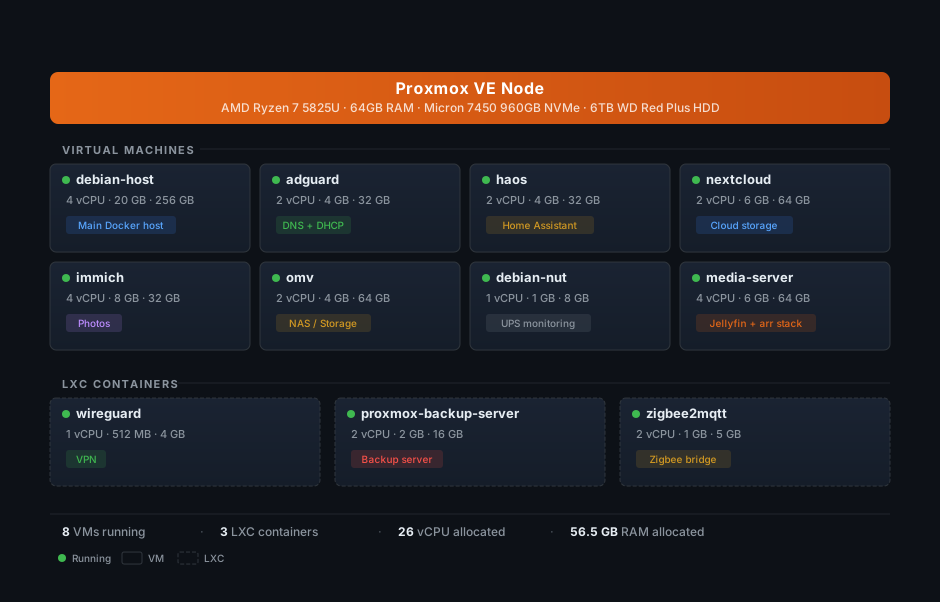
Here’s how everything is laid out on the single Proxmox node:
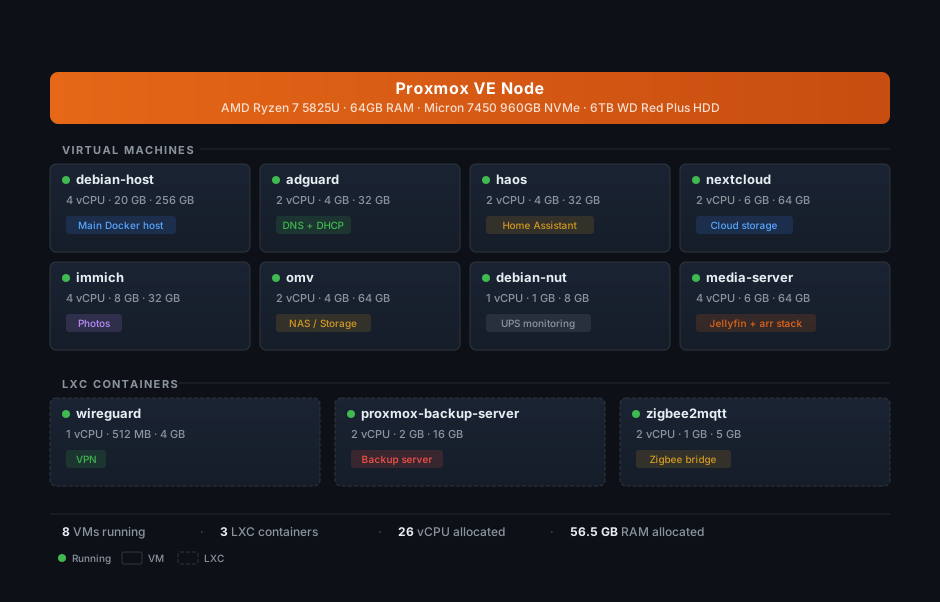
One thing that helps a single 64GB machine run all of this is memory ballooning. Several VMs (debian-host, immich, nextcloud, omv, haos, media-server) have a balloon minimum set lower than their max RAM. Proxmox dynamically reclaims unused memory from idle VMs and gives it to busy ones. So debian-host has a ceiling of 20GB but a balloon floor of 8GB – if it’s only using 12GB, the other 8GB is available for the rest of the cluster.
Storage: ZFS, NVMe, and HDD pools#
The storage setup uses three drives, each with a different job:
- Corsair MP600 MINI 1TB (
local/local-lvm): Proxmox itself, ISO templates, LVM thin provisioning. - Micron 7450 960GB NVMe (
nvme-pool, ZFS): All VM and LXC root disks live here. Fast reads/writes for the OS and application layers. - 6TB WD Red Plus HDD (
hdd-pool, ZFS): Bulk data storage. Photos, files, media libraries.
OpenMediaVault (OMV) runs in its own VM and handles file sharing. I intentionally didn’t configure disk passthrough – PVE manages the ZFS pool directly and mounts a dataset into the OMV VM. OMV then re-exports that storage to other VMs via NFS shares and bind mounts, so Immich, Nextcloud, and the media server all write their data to the HDD through OMV. This keeps the actual data separate from the application VMs, which makes backups and storage management a lot cleaner.
Part of the HDD is also dedicated to Proxmox Backup Server for storing VM and LXC backup snapshots – keeping backups on a separate physical drive from the VMs they’re backing up.
The future plan is to add a second HDD in RAID1 (mirroring) for faster recovery from a single-disk failure, plus a dedicated third HDD for media files that don’t need backup (the arr stack can re-download anything it has). And since someone always needs to say it: RAID is not a backup. RAID protects against drive failure; it does not protect against accidental deletion, ransomware, or your house burning down. That’s what the offsite backups are for – more on that in the backups section.
40+ self-hosted services: the complete list#
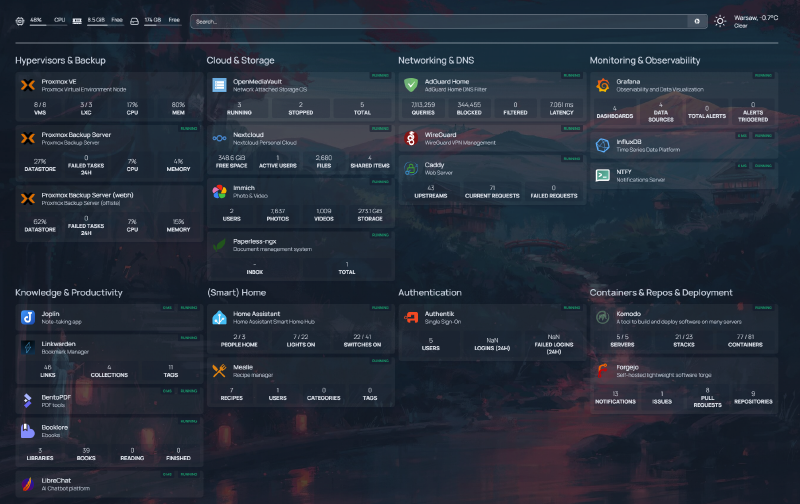
Across 23 Docker Compose stacks and a few dedicated VMs/LXCs, here’s what’s actually running. Everything is managed through Komodo, which acts as a deployment and orchestration layer on top of Docker Compose, with Periphery agents running on five VMs: debian-host, media-server, immich, nextcloud, and adguard. Here’s what the Homepage dashboard looks like with everything wired up:
| Category | Services |
|---|---|
| Infrastructure | Caddy, Authentik, Forgejo, Homepage, Komodo, ntfy |
| Media | Jellyfin, Seerr, Radarr, Sonarr, Prowlarr, + 7 more |
| Productivity | Nextcloud, Joplin, Paperless-ngx, Mealie, BentoPDF |
| Photos | Immich |
| Knowledge | BookLore, Linkwarden |
| AI | LibreChat |
| Smart Home | Home Assistant, Zigbee2MQTT |
| Monitoring | Grafana, Telegraf, InfluxDB, NUT |
Infrastructure and reverse proxy#
These keep everything else running:
- Caddy – reverse proxy for all
*.samik.devsubdomains. Handles TLS termination and automatic Let’s Encrypt certificates – even for local-only domains that aren’t reachable from the internet (more on that in the networking section). I picked Caddy over Traefik or Nginx because the Caddyfile syntax is dead simple and automatic HTTPS just works. - Authentik – SSO and identity provider. One login for 10 apps (more on this later).
- Forgejo – self-hosted Git forge, basically a lightweight GitHub. All my Docker Compose files, configs, and personal projects live here.
- Homepage – a dashboard that aggregates all services into one page.
- Komodo – container management and GitOps deployment.
- Cloudflare DDNS – keeps a domain pointed at my home IP so I always have a stable address for WireGuard VPN connections.
Media server and *arr stack#
This runs on its own dedicated VM (media-server, 4 vCPU, 6GB RAM):
- Jellyfin – media streaming. Movies, TV shows, music. The self-hosted Plex alternative that doesn’t phone home.
- *The arr stack – Seerr (requests, formerly Jellyseerr), Prowlarr (indexers), Radarr (movies), Sonarr (TV), Bazarr (subtitles), Lidarr (music), Autobrr (automation), qBittorrent, plus supporting containers like Flaresolverr and databases. 12 services in one Compose stack. It’s a lot, but they all work together as a pipeline.
Productivity#
- Nextcloud – cloud storage and office suite. Runs as Nextcloud AIO on its own VM. The Google Drive / Dropbox replacement.
- Joplin – note-taking with sync. Markdown-based, end-to-end encrypted.
- Paperless-ngx – document management. Scan something, throw it in, and it OCRs and tags it automatically.
- Mealie – recipe management. Paste a URL, it extracts the recipe. Surprisingly useful.
- BentoPDF – PDF toolkit for merging, splitting, and converting documents.
Photos#
- Immich – Google Photos replacement, running on a dedicated VM with 4 vCPU and 8GB RAM. Face recognition, map view, automatic organization. This is one of the most polished self-hosted apps I’ve ever used.
Knowledge and reading#
- BookLore – ebook management and reading. A clean web UI for organizing and reading your epub/PDF library.
- Linkwarden – bookmark management with archiving. Saves full page snapshots so links don’t rot.
AI#
- LibreChat – self-hosted AI chat interface that supports multiple model providers (OpenAI, Anthropic, local models). One UI, many backends. Conversations stay on my server.
Notifications#
- ntfy – push notification server. Any service that needs to send me a notification – backup failures, completed downloads, Home Assistant alerts, deployment updates – routes through ntfy, and I get it as a push notification on my phone. Even apps that don’t natively support ntfy can usually be wired up through its generic webhook support, which makes it work as a kind of universal notification broker. Trivial to set up and surprisingly versatile.
Smart home#
- Home Assistant OS – dedicated VM for home automation. Runs the full HAOS with Supervisor, so add-ons work natively.
- Zigbee2MQTT – LXC container bridging Zigbee IoT devices to MQTT, which Home Assistant consumes.
Networking: DNS, reverse proxy, and VPN#
The networking setup ties everything together. The request flow for accessing any service looks like this:
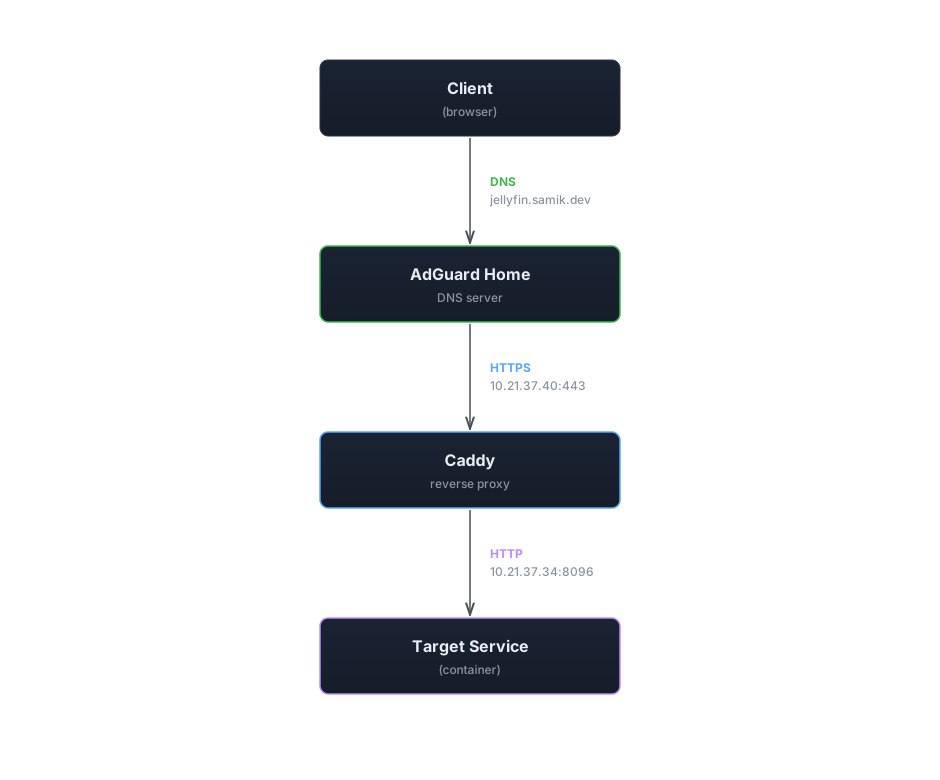
AdGuard Home runs in a dedicated VM and acts as both the DNS server and DHCP server for the entire network. It has 44 DNS rewrite rules – one for each *.samik.dev subdomain – all pointing to 10.21.37.40, which is the IP of the debian-host VM where Caddy runs.
Caddy receives the request, terminates TLS, and reverse proxies to the correct service based on the subdomain. Beyond the dead-simple reverse proxy config, the real win with Caddy is how it handles TLS certificates on a local network. My *.samik.dev subdomains don’t have public DNS records – they only resolve locally through AdGuard. That normally means you’re stuck with self-signed certs and browser warnings everywhere. But Caddy supports the ACME DNS-01 challenge via Cloudflare, which proves domain ownership by creating a temporary DNS TXT record instead of serving a file over HTTP. No inbound traffic required.
The setup is minimal. A global block tells Caddy to use the DNS challenge for all ACME requests, and each site gets a tls block pointing at Cloudflare:
{
    acme_dns cloudflare {env.CF_API_TOKEN}
}

grafana.samik.dev {
    reverse_proxy http://10.21.37.40:3333
    tls {
        dns cloudflare {env.CF_API_TOKEN}
    }
}
That’s it. Caddy automatically obtains and renews real Let’s Encrypt certificates for every subdomain, even though none of them are reachable from the internet. Every service in my homelab gets legitimate TLS – no cert warnings, no manual renewal, no exposed ports. It works very well for local networks.
WireGuard runs in a tiny LXC container and gives me VPN access to the entire network when I’m away from home. Combined with the DNS setup, I can access jellyfin.samik.dev from my phone on cellular data just as easily as from my couch. I don’t expose any services directly to the internet – everything goes through the VPN. Cloudflare DDNS keeps a domain pointed at my home IP so I always have a stable address to connect WireGuard to, even when my ISP rotates my IP.
Single sign-on with Authentik#
Managing separate accounts for 40+ services would be a nightmare, so Authentik handles single sign-on via OAuth2/OIDC. One set of credentials, one login session, and you’re authenticated everywhere.
Currently 10 apps are configured with SSO: BookLore, Forgejo, Immich, Komodo, LibreChat, Linkwarden, Mealie, Nextcloud, Paperless-ngx, and Seerr. Each has an OAuth2/OpenID Connect provider configured in Authentik. For most of these, adding SSO was a matter of creating a provider in Authentik and pointing the app’s OAuth settings at it – maybe 10 minutes of work per app (less now that I have custom MCP servers to automate it, but that’s the next post in this series).
3-2-1 backup strategy: Proxmox Backup Server, Kopia, and offsite sync#
A homelab without backups is just a disaster waiting to happen. The backup strategy follows the 3-2-1 rule: three copies of data, on two different media types, with one copy offsite.
Proxmox Backup Server (PBS) runs in an LXC container and handles daily automated snapshots of every VM and every LXC container overnight while I sleep. PBS deduplication is excellent – even with daily snapshots of 11 guests, storage growth is manageable.
The critical piece is the encrypted offsite sync: the local PBS replicates to a remote PBS instance running on a VPS. If my mini PC dies, gets stolen, or my apartment floods, the offsite copy has everything needed to rebuild.
For application-level data, Kopia separately backs up Immich photos, Nextcloud files, and my PC data to an external Kopia repository on the same VPS. PBS handles the VM/LXC infrastructure snapshots; Kopia handles the actual user data.
Homelab monitoring: Grafana dashboards, Telegraf, and UPS tracking#
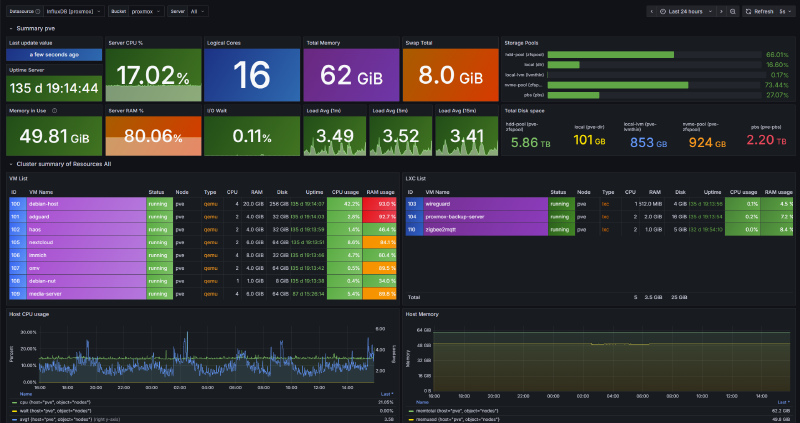
Grafana dashboards powered by Telegraf (metrics collection) and InfluxDB (time-series storage) give me visibility into everything. The PVE overview dashboard shows uptime, CPU and RAM usage, storage pool status, and per-VM resource graphs at a glance:
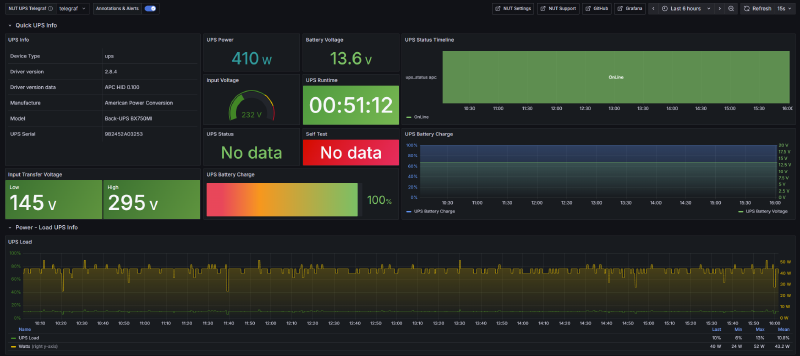
NUT (Network UPS Tools) runs in a dedicated tiny VM and monitors an APC UPS that backs up the mini PC, router, and ONT. Telegraf pulls NUT metrics into InfluxDB, so I get a dedicated Grafana dashboard for battery voltage, charge level, runtime estimates, and power load over time:
Komodo provides container-level monitoring – stack health, deployment status, and logs across all five servers. Between Grafana for host metrics and Komodo for container health, I rarely need to SSH into anything to figure out what’s going on.
What’s next#
This tour covers what’s running, but not how it all gets managed day-to-day. Manually wrangling 40+ services across multiple VMs gets old fast – adding a new service used to mean creating a DNS rewrite in AdGuard, configuring an OAuth provider in Authentik, deploying a Compose stack in Komodo, and adding a reverse proxy rule in Caddy, all in separate web UIs. I kept forgetting steps.
So I built four custom MCP servers that let Claude Code talk directly to AdGuard, Authentik, Komodo, and Proxmox. Adding a new service is now a single terminal conversation instead of a scavenger hunt across admin panels. That’s what the next post in this series covers: Controlling my homelab with Claude Code and custom MCP servers.